01 · Utility Forge · Network

PortWho

In development

Which process owns port 8080?

Find out exactly which process or Windows service owns a TCP or UDP port.

PortWho lists every listening TCP socket and bound UDP socket on Windows and names the process, executable, hosted services and code signature behind it. Read-only, offline, no installation ceremony.

Release
None yet
Status
In development
Model
Free
Windows
Windows 11 (tested on x64)
Architecture
x64
Packaging
Portable ZIP (planned)
Licence
To be announced
Changes your system
No, read-only

Live demonstration · sample data

Trace any port to its owner.

A simulated Windows host with the same fields PortWho reports. Ask about a port, filter like the command line, and read the answer as a chain, as the details view or as JSON.

PortWho · ownership map

Sample data · simulated Windows host
Red flow = resolution, not network traffic 16 of 16 endpoints

Filter, like the command line

Equivalent portwho

TCP 127.0.0.1:8080 Owner chain
  1. 01 Endpoint TCP 127.0.0.1:8080 Listening socket
  2. 02 Process MyApi · PID 5120 Opened with read-only query rights
  3. 03 Executable MyApi.exe C:\Users\me\source\MyApi\bin\Debug\net10.0\
  4. 04 Services none Not a service host
  5. 05 Publisher ! unsigned No embedded or catalog signature
Table view All 16 endpoints, as portwho lists them
Proto Address Port PID Process Services Signature Action
UDP 0.0.0.0 123 1880 svchost W32Time Microsoft Corporation
TCP 0.0.0.0 135 1116 svchost RpcEptMapper, RpcSs Microsoft Corporation
TCP :: 135 1116 svchost RpcEptMapper, RpcSs Microsoft Corporation
TCP 0.0.0.0 445 4 System - -
UDP 0.0.0.0 1900 3880 svchost SSDPSRV Microsoft Corporation
TCP 0.0.0.0 5040 6312 svchost CDPSvc Microsoft Corporation
UDP 0.0.0.0 5353 2240 svchost Dnscache Microsoft Corporation
UDP :: 5353 2240 svchost Dnscache Microsoft Corporation
UDP 0.0.0.0 5355 2240 svchost Dnscache Microsoft Corporation
TCP 0.0.0.0 7680 4412 svchost DoSvc Microsoft Corporation
TCP 127.0.0.1 8080 5120 MyApi - unsigned
TCP 0.0.0.0 49664 1004 lsass (access denied) KeyIso, SamSs -
TCP 0.0.0.0 49665 872 wininit - Microsoft Corporation
TCP 0.0.0.0 49666 1672 svchost EventLog Microsoft Corporation
TCP 0.0.0.0 49667 2244 svchost Schedule Microsoft Corporation
TCP 0.0.0.0 49668 3020 spoolsv Spooler Microsoft Corporation

Capabilities

What it does

  • Listening TCP and bound UDP sockets

    IPv4 and IPv6 endpoints exactly as Windows reports them, including duplicate UDP bindings.

  • Process and executable path

    Owning PID, process name and the executable path when Windows allows the process to be opened. An owner that exited, or whose PID was reused, is reported as such rather than misattributed.

  • Hosted Windows services

    Service names and display names inside the owning process, so svchost.exe is explained rather than hidden.

  • Code signature status

    Embedded or catalog Authenticode signature with signer, organisation and issuer, verified without network access.

  • Search and filters

    Filter by port, protocol, address family, process id or free text across names, paths, services and publishers.

  • Structured JSON

    One document per run with a versioned schema for scripts and support reports.

  • Desktop application

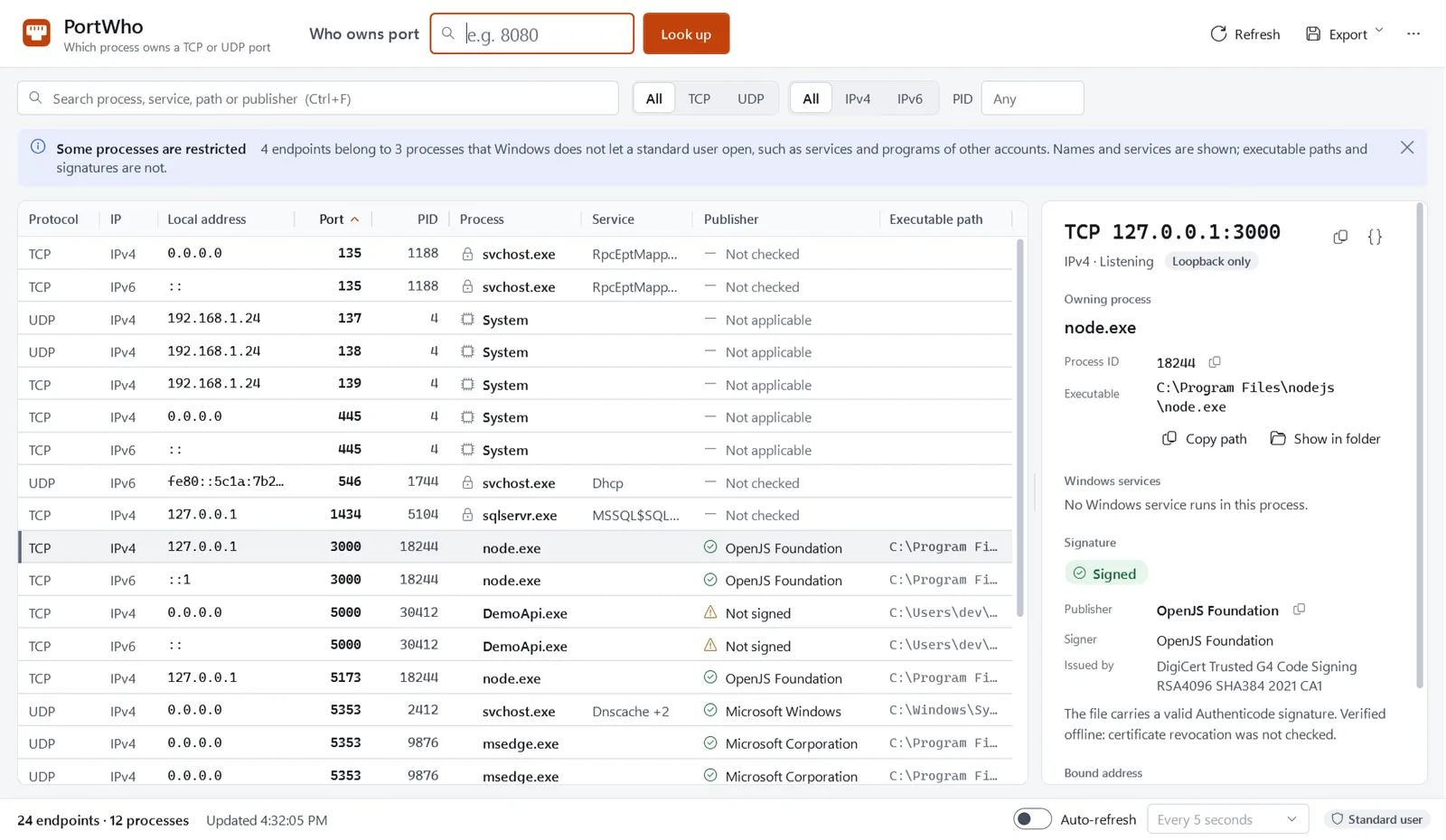
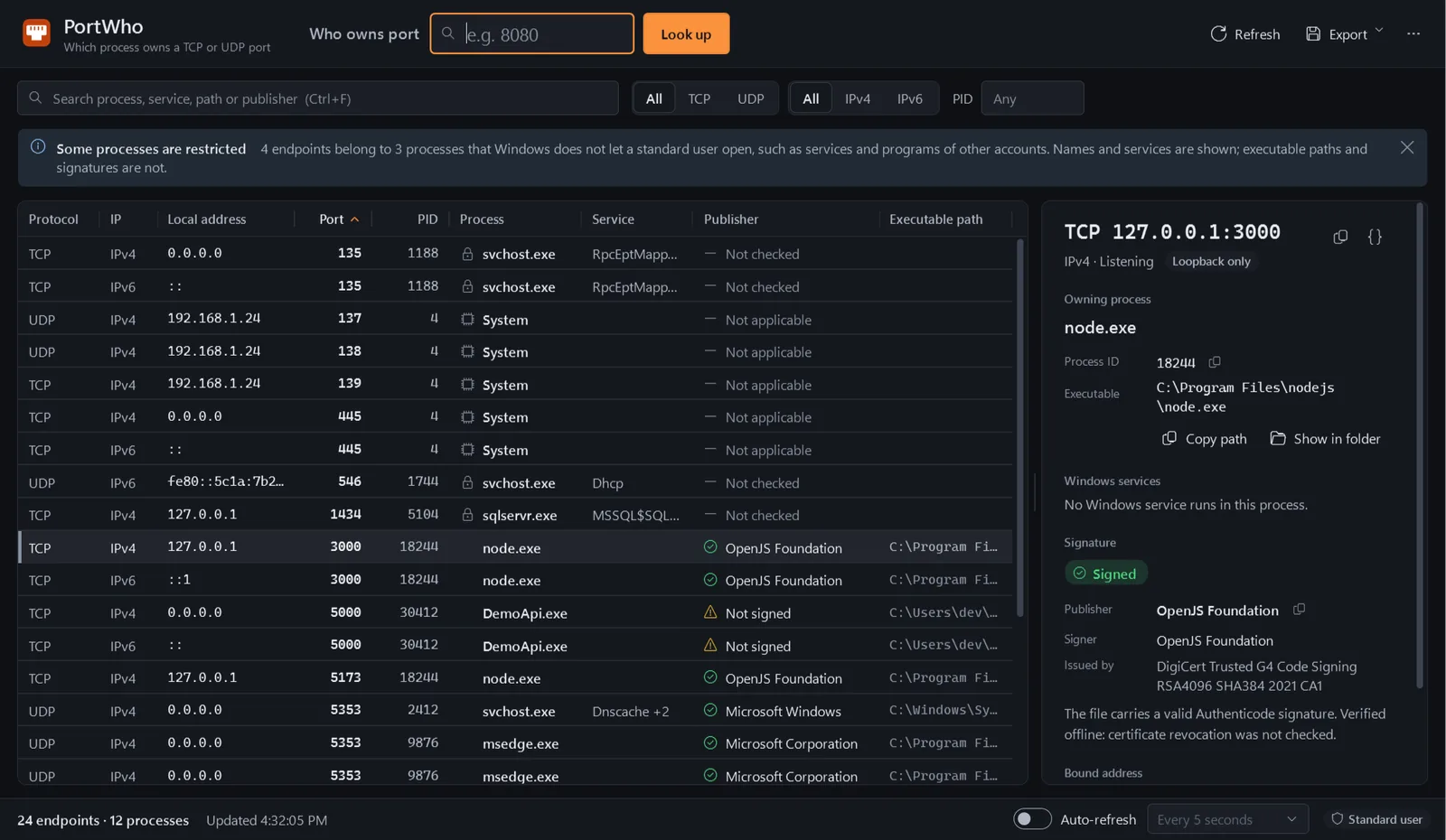
    The same engine in a WPF window with a port lookup box, a stable sortable table, a details pane that explains the bound address and restricted processes, refresh, JSON and CSV export, light, dark and contrast themes, and full keyboard and screen-reader operation.

  • Explanations for reserved port ranges Planned

    Hyper-V and WSL excluded port ranges are not listed yet; today the "port is free" message says how to check them by hand.

  • Plain-language guidance for unfamiliar owners Planned

    The next increment in the Blueprint, read-only, explains what an unfamiliar listener is likely to be and what is safe to do next, without a safe or dangerous score.

Deliberately out of scope

  • It does not show established connections or remote peers; the question it answers is "who owns this port".
  • It does not stop processes, change services or add firewall rules. Any such action would need its own design and security review; none is scheduled.
  • It does not monitor traffic, inspect packets or act as a firewall, and it is not a malware scanner.

Explanation

How it works

The problem

A development server refuses to start because port 8080 is “already in use”. A service you did not install is listening on every interface. netstat -ano gives you a process id, tasklist gives you a name, and if the name is svchost.exe you are still no wiser. Finding the real owner of a port on Windows means stitching together three or four commands and knowing which columns to trust.

What PortWho does

PortWho asks Windows for every listening TCP socket and bound UDP socket, then resolves each owner once: the process, its executable path, the services hosted inside it, and the Authenticode signature on the executable. The result is one row per endpoint with everything you need to decide what it is.

PROTO  ADDRESS      PORT   PID  PROCESS  SERVICES             SIGNATURE
-----  -----------  ----  ----  -------  -------------------  ---------------------
TCP    0.0.0.0       135  1116  svchost  RpcEptMapper, RpcSs  Microsoft Corporation
TCP    ::            135  1116  svchost  RpcEptMapper, RpcSs  Microsoft Corporation
TCP    0.0.0.0       445     4  System   -                    -
UDP    0.0.0.0      5353  2240  svchost  Dnscache             Microsoft Corporation
TCP    127.0.0.1    8080  5120  MyApi    -                    unsigned

The table above is sample data rendered in the current command line’s exact format; the rows on your machine will differ.

Asking about a single port switches to the detailed view:

TCP 127.0.0.1:8080
  Process    MyApi (PID 5120)
  Path       C:\Users\me\source\MyApi\bin\Debug\net10.0\MyApi.exe
  Services   none
  Signature  unsigned

What it deliberately does not do

PortWho is read-only. It never stops a process, closes a socket or changes a service. It does not watch traffic. When Windows refuses to open a process, PortWho says so for that row instead of asking for elevation or failing the whole listing.

How the engine resolves owners

  1. The IP Helper API returns the listening TCP and bound UDP tables for IPv4 and IPv6, each row with its owning process id.
  2. Every distinct process is inspected once: name, executable path and the list of services hosted in that process (from the service control manager), which is what turns svchost.exe into “RpcEptMapper, RpcSs”.
  3. The executable is verified with WinTrust: embedded signature, security-catalog signature, unsigned, invalid or unavailable, including the signer, organisation and issuer. Verification never touches the network.
  4. Rows are reported exactly as Windows reports them. Two UDP sockets sharing an address and port through SO_REUSEADDR appear twice, because that is what is bound.

Current status

Part State
Engine, portwho command line, JSON schema v1 Implemented, tested on Windows CI
PortWho.exe desktop application Implemented, tested internally
Portable ZIP packaging and verifier Implemented; unsigned internal builds only
Release signing decision Open: no certificate exists
Public release None. Nothing is offered for download

Internal packages have been run only on Windows 11 x64. Until a public release exists, the quick start explains what building from source involves, and the guides show how to answer the same questions with the tools Windows already has.
Datasheet

What it touches, and what it does not

Project publisher
RedLine Final legal publisher name pending.
Code signature
Not decided yet Each release states whether it is signed before you download it.
SHA-256
Published with each release
Packaging
Portable ZIP
Telemetry
None
Account
Not required
Administrator rights
Not required Runs as a standard user and never asks for elevation. Windows then withholds the executable path, and so the signature, of services and other accounts' processes; their names and services are still shown.
Network access
None No network connections at all. Signature verification runs offline; revocation checks are disabled and certificate chains are built from the local cache only.
Changes your system
No, read-only PortWho never stops processes or touches sockets, services or firewall rules. The desktop app writes only its own settings, and an error log after an unexpected failure, in %LOCALAPPDATA%\PortWho.

Implemented and tested internally. There is no public release and nothing to download yet.

Revision block · status today
Rev Part Status
A1 Read-only engine IP Helper enumeration, process, service and Authenticode resolution, including exited and reused process IDs. Implemented
A2 Command line (portwho) Table, details and JSON views with filters. Implemented
A3 JSON output (schema v1) Implemented
A4 WPF desktop application (PortWho.exe) Port lookup, filters, details pane, background signature checks, JSON and CSV export. Tested internally; not released. Implemented
A5 Packaging and release verification Reproducible portable ZIPs with SHA-256 sums, a manifest, an independent verifier and tamper tests. Every package so far is an unsigned internal build. Implemented
A6 Windows CI Build, format check, tests and an unsigned internal package on every change. Implemented
C1 Release signing decision No code-signing certificate exists. Free signing is being evaluated; the first x64 release may instead be unsigned, only after an independent rebuild and review and the owner's approval. Planned
C2 Public release Nothing is published or downloadable. Planned
Implemented
Merged into the main branch and covered by automated tests on Windows. Implemented is not the same as released.
Planned
Not started.
Released
Nothing yet. No part of this product has been signed or published, and nothing can be downloaded.

Quick start

The common task, before you need a manual.

  1. Build the command line

    No build is published yet. Until the first public release, the command line is built from source with the .NET SDK pinned in global.json.

    Needs access to the source repository, which is private during development.

    cd apps/portwho && dotnet build PortWho.slnx --configuration Release
  2. Ask about one port

    A single port shows the detailed view with path, services and signer.

    portwho 8080
  3. List everything

    The compact table lists every listening and bound endpoint.

    portwho
  4. Script it

    JSON output follows a versioned schema that is safe to parse.

    portwho --json

Documentation

Reference

Getting started Quick start
Core concepts How PortWho resolves port owners
CLI Command-line reference
CLI JSON output
Troubleshooting Troubleshooting
FAQ FAQ
Security and privacy Security and privacy

Release history

Versions

No releases published yet

Every release will appear here with its version, date, checksums and notes. Published versions are immutable.

Guides

Problems PortWho answers

How-to · 7 min · updated

Find what is using port 8080 on Windows

Your dev server says port 8080 is already in use. Find the process behind it with netstat, tasklist and PowerShell, learn what the listening addresses mean, and free the port without breaking something else.

Troubleshooting · 8 min · updated

Port in use but no process is listed on Windows

netstat shows nothing on the port, yet your program still cannot bind to it. Work through the causes one check at a time: reserved port ranges, TIME_WAIT, PID 4, IPv6, Docker and WSL forwarding, permissions and the firewall.

Explainer · 7 min · updated

What is svchost.exe and why does it use so many ports?

svchost.exe is the host process for Windows services, which is why it owns ports such as 135, 1900 and 5353. Learn how service groups work, how to see which service lives in which copy, and how to tell a genuine svchost from an impostor.

FAQ

Questions people ask

Is PortWho free?

Yes. PortWho is free, with no paid edition, subscription, account or activation. The licence text has not been finalised yet and will be published with the first release.

Does it need administrator rights?

No. PortWho runs as a standard user and never asks for elevation. Windows does not let a standard user open some processes (services, other accounts' programs, protected processes); for those rows PortWho still shows the name and hosted services, says the process is restricted, and leaves the path and signature empty rather than failing the whole listing.

Does it send anything to the internet?

No. PortWho has no network features. Even signature verification is offline: revocation checks are disabled and certificate chains are built from the local cache.

Will it tell me whether a listener is malware?

No. PortWho reports facts: which process owns the port, where its executable is, which services it hosts and what Windows can verify about its signature. An unsigned or unfamiliar owner is not proof of malware, and a valid signature is not proof of safety. For a suspicious file, start with the guide on inspecting a file with built-in Windows tools and use Windows Security to scan it.

Can I download it today?

Not yet. The engine, the command line and the desktop app are implemented and tested internally, and the packaging pipeline produces unsigned internal builds, but nothing is published. The first public release will be published on this site with SHA-256 checksums and will say before download whether it is signed. It may be unsigned only after an independent rebuild and review and the owner's approval; Windows would then show no verified publisher and may warn about or block it.