02 · Utility Forge · Files

FileScope

In development

What is this file, really?

Tell me what this file actually is, without executing or uploading it.

FileScope identifies a file from its content rather than its extension, calculates SHA-256, verifies the Authenticode signature offline, reads the Mark-of-the-Web and explains each finding in plain language. Read-only and local; it never runs or uploads the file and never calls it safe or dangerous.

Release
None yet
Status
In development
Model
Free
Windows
Windows 11 (tested on x64)
Architecture
x64
Packaging
Portable ZIP (planned)
Licence
To be announced
Changes your system
No, read-only

Worked example · illustrative values

The path it makes visible.

The question-to-answer path FileScope follows, with illustrative values. FileScope is implemented and tested internally but not released, so nothing here can be downloaded yet.

FileScope · from question to answer

Illustrative example

What is this file, really?

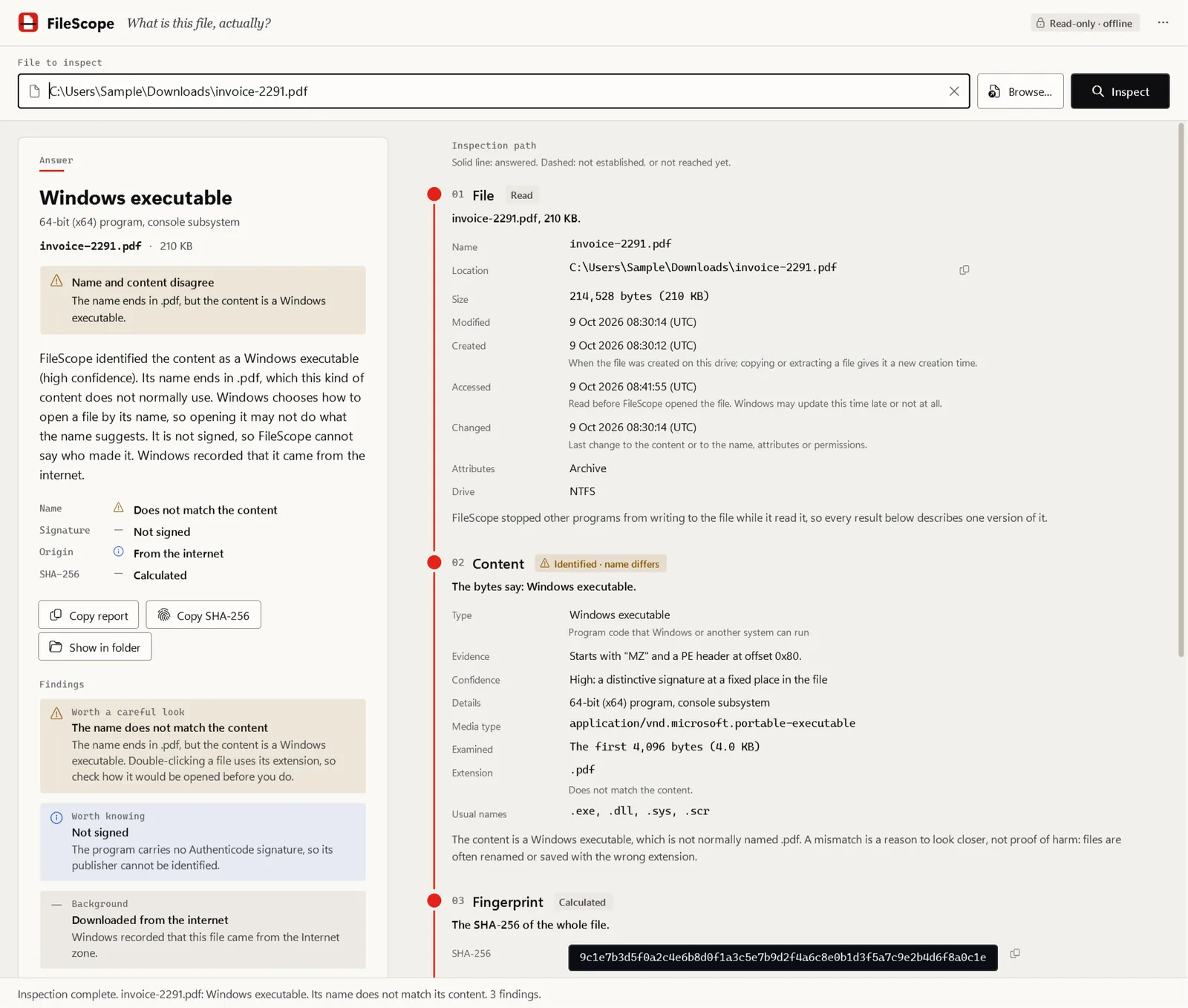
  1. 01 File report.pdf Dropped onto the window. Never executed, never uploaded.
  2. 02 Metadata 210 KB · from the internet Size, dates, SHA-256 and Mark-of-the-Web.
  3. 03 Identity Windows program (MZ/PE), not a PDF Identified by its content signature, not its extension.
  4. 04 Findings Extension mismatch · not signed Each explained in plain language, without a verdict.

Answer A Windows program named like a PDF, unsigned, downloaded from the internet. A reason to look closer before opening it.

Capabilities

What it does

  • Real file type from the content

    Identifies executables, documents, Office and other ZIP-based formats, archives, disk images, media, fonts and data files from their bytes, with a confidence level and the evidence it used.

  • Extension mismatch and deceptive names

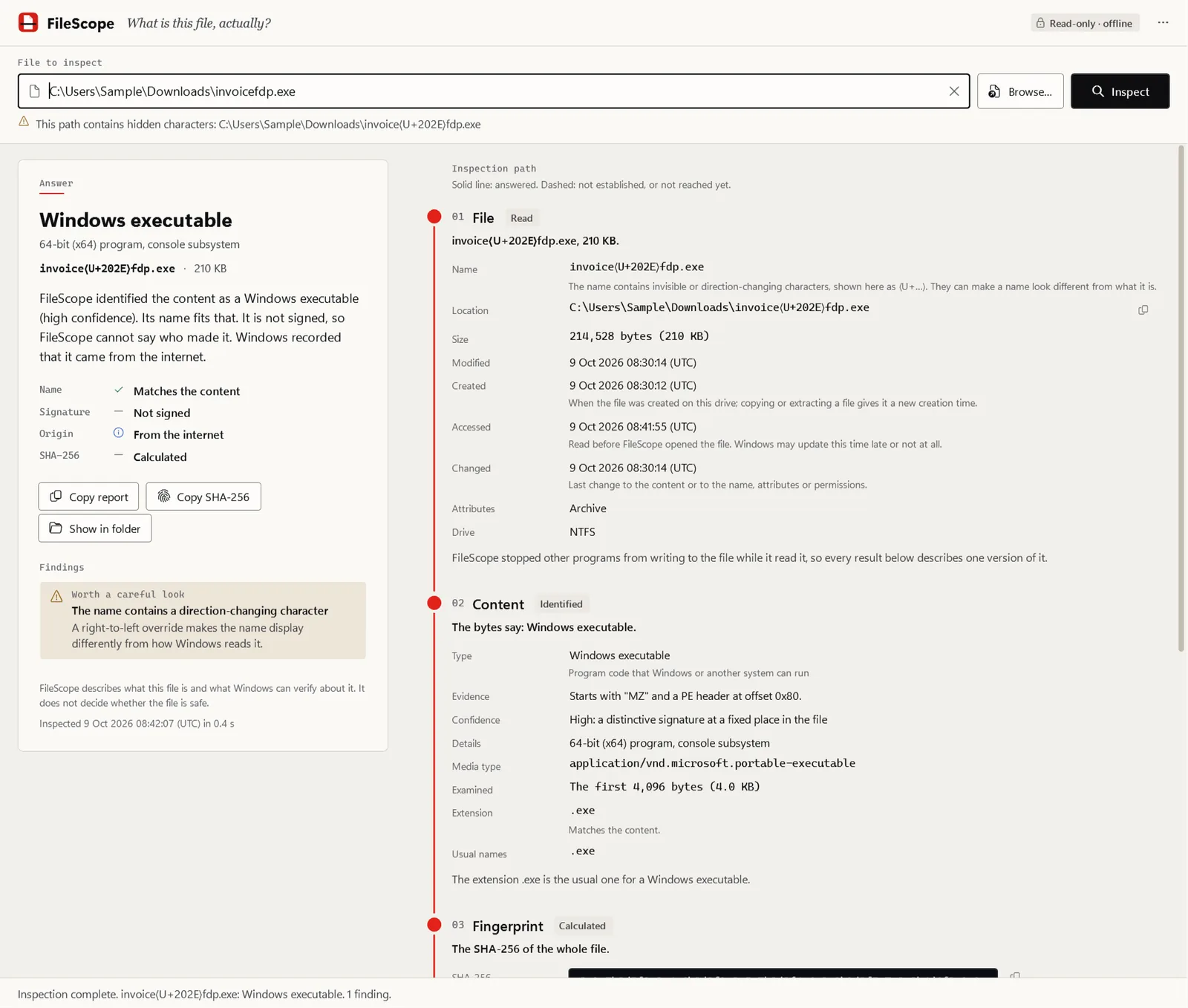
    Flags content that contradicts the extension (a program named .pdf), double extensions such as .pdf.exe, padded names, and right-to-left or invisible characters that make a name read differently from how Windows reads it.

  • SHA-256 with change detection

    Hashes the whole file while other programs are kept from writing to it. If the file still changes while it is read, the hash and signature verdict are withheld rather than reported for a version that no longer exists.

  • Authenticode signature, verified offline

    Embedded or security-catalog signature with signer, issuer and timestamp. A publisher is named only for a valid signature; otherwise the signer appears as "claims to be", unverified.

  • Mark-of-the-Web

    Reads the Zone.Identifier stream Windows attaches to downloads, including the zone and, when recorded, the download and referrer addresses.

  • Plain-language findings

    Each finding says what was observed and why it matters, without verdict words such as safe, clean or malware.

  • Desktop application and command line

    Drag and drop, paste or browse in the desktop app, with copy report, copy SHA-256 and show in folder; the same engine in filescope.exe with JSON output for scripts.

Deliberately out of scope

  • It is not an antivirus and never decides whether a file is safe. Use Windows Security to scan a file.
  • It never opens, runs, unpacks or uploads the file, and it does not change or delete it.
  • It inspects one file per run. It does not scan folders or look inside archives.
  • Identification reads the first 64 KiB, so content appended later in a file (for example an installer's payload) is not identified.
  • Revocation is not checked online, so a certificate revoked after Windows last cached revocation data is not detected.

Explanation

How it works

The problem

An attachment called report.pdf arrives, or a download finishes with a name you do not recognise. Windows decides how to open a file from the last part of its name, and File Explorer hides known extensions by default, so the name tells you what the file claims to be, not what it is. Finding out by hand means reading header bytes, calculating a hash, checking a signature and looking for an alternate data stream, with four different commands and no explanation of what the results mean. The guide Inspect a suspicious file with built-in Windows tools walks through exactly that.

What FileScope does

FileScope does those steps in one read-only pass and keeps every result next to what it means:

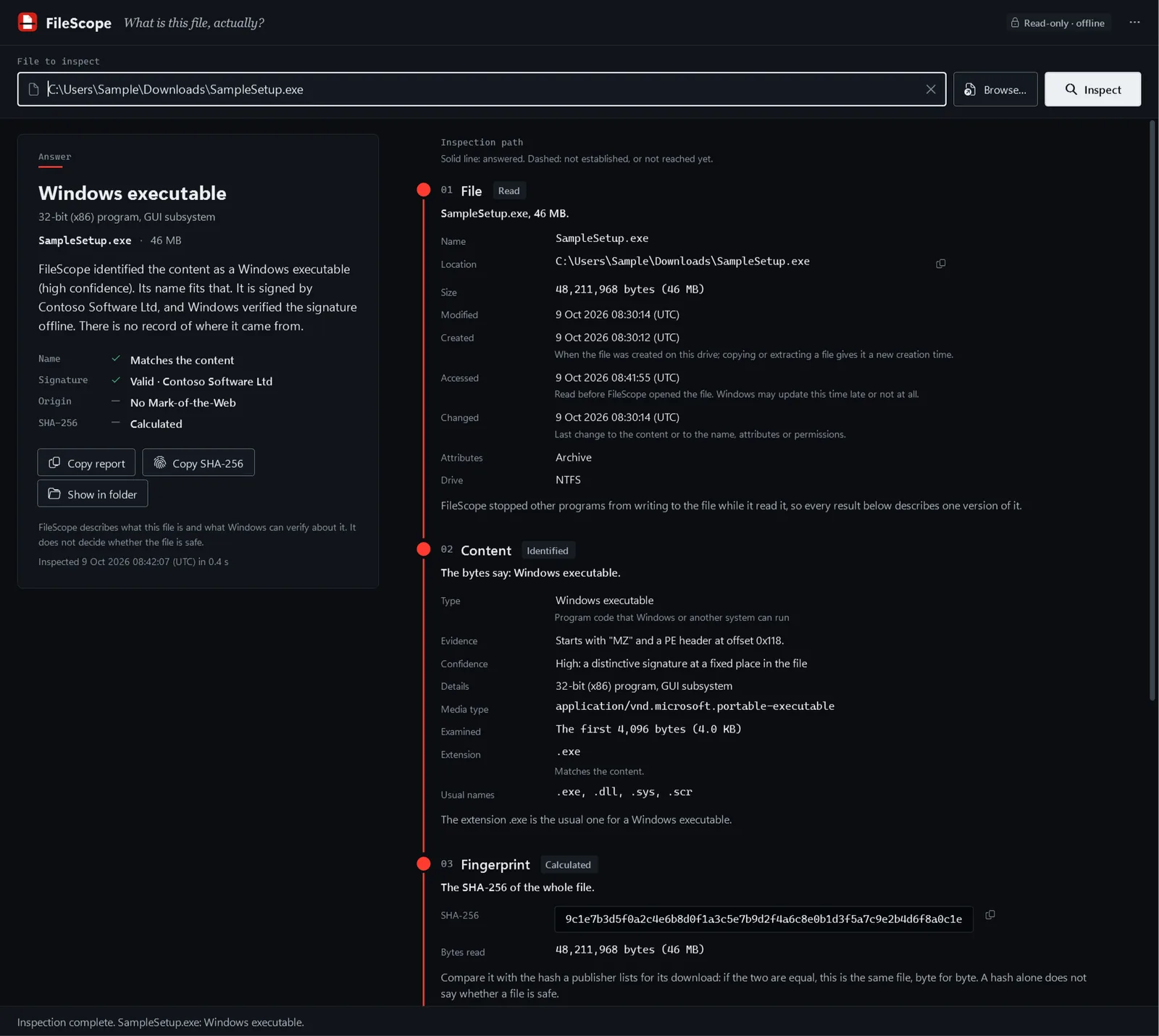
  1. File. Size, dates, attributes and file system, captured from the open file before anything is read. Links and junctions are followed the way any program would follow them, and reported.
  2. Content. The first 64 KiB are compared with known format signatures. A Windows program starts with MZ and a PE header; a PDF with %PDF; a Word document is a ZIP with a word/ folder inside. The match comes with its evidence and a confidence level, and only a high-confidence match can be reported as an extension mismatch.
  3. Fingerprint. SHA-256 of the whole file, so you can compare it with the hash a publisher lists for its download.
  4. Signature. Windows verifies the Authenticode signature, embedded or through a security catalog, against the certificates already on the computer. Revocation is not checked online.
  5. Origin. The Mark-of-the-Web, if Windows recorded one, with the zone and, when the downloading program recorded them, the download and referrer addresses.

The command line prints the same sections:

FileScope 0.1.0. Read-only: the file was not run, changed or uploaded.

Content
  Type           Windows executable (PE)
  Confidence     high
  Extension      .exe (consistent)

Signature
  Status         Not signed
  Note           Verified offline against this computer's trusted certificates; revocation was not checked online.

Origin (Mark-of-the-Web)
  Status         Present: Internet zone (ZoneId 3)

Findings (4)
  [warning] Name ends in two extensions
            The name ends in ".pdf.exe". Windows uses only the last one, ".exe", and File Explorer hides known extensions by default, so the file may appear to be a ".pdf" file.

This is an abridged example from the command-line documentation; the full output also lists the file details and the SHA-256.

What a result does not mean

FileScope’s wording is tested against a few rules that also apply when you check a file by hand:

  • Unsigned is not malware. Many legitimate programs are unsigned. It means Windows cannot tell who published the file.
  • A valid signature is not safety. It says who signed the file and that it has not changed since. Signed malware exists, and a genuine signed program can be renamed to look like something else.
  • No mark is not trust. Files copied from a USB stick, synchronised by a cloud client or downloaded with many command-line tools never get a Mark-of-the-Web.
  • Nothing is invented. Anything FileScope could not determine is shown as not available, with the reason.

Current status

Part State
Inspection engine and filescope command line Implemented, tested on Windows CI
FileScope.exe desktop application Implemented, tested internally
Portable ZIP packaging and verifier Implemented; unsigned internal builds only
Release signing decision Open: no certificate exists
Public release None. Nothing is offered for download

Internal packages have been run only on Windows 11 x64.

Datasheet

What it touches, and what it does not

Project publisher
RedLine Final legal publisher name pending.
Code signature
Not decided yet Each release states whether it is signed before you download it.
SHA-256
Published with each release
Packaging
Portable ZIP
Telemetry
None
Account
Not required
Administrator rights
Not required Runs as a standard user. A file your account cannot read is reported as access denied, with no attempt to elevate.
Network access
None FileScope has no network code. A file on a network share is read over that share like any other program would; an online-only OneDrive file is downloaded only after you allow it.
Changes your system
No, read-only Never runs, changes, moves, repairs, quarantines or uploads the file. The desktop app stores only its theme, zoom and window position, never which files were inspected.

Implemented and tested internally. There is no public release and nothing to download yet.

Revision block · status today
Rev Part Status
A1 Inspection engine Content identification, extension check, SHA-256, offline Authenticode, Mark-of-the-Web and findings. Several hundred automated tests, including fuzzed and tampered input. Implemented
A2 Command line (filescope) Readable output with hidden characters revealed, and JSON (schema v1) for scripts. Implemented
A3 WPF desktop application (FileScope.exe) Drop, paste or browse for a file; answer first, evidence below. Tested internally; not released. Implemented
A4 Packaging and release verification Reproducible portable ZIPs with SHA-256 sums, a manifest and an independent verifier. Every package so far is an unsigned internal build. Implemented
C1 Release signing decision No code-signing certificate exists. Free signing is being evaluated; an unsigned FileScope release would need its own policy decision. Planned
C2 Public release Nothing is published or downloadable. Planned
Implemented
Merged into the main branch and covered by automated tests on Windows. Implemented is not the same as released.
Planned
Not started.
Released
Nothing yet. No part of this product has been signed or published, and nothing can be downloaded.

Quick start

The common task, before you need a manual.

  1. Build the command line

    No build is published yet. Until the first public release, FileScope is built from source with the .NET SDK pinned in global.json.

    Needs access to the source repository, which is private during development.

    cd apps/filescope && dotnet build FileScope.Engine.slnx -c Release
  2. Inspect a file

    Prints the file, content, hash, signature, origin and findings sections. Exit code 0 means the file was inspected completely, whatever was found.

    filescope .\setup.exe
  3. Script it

    JSON follows a versioned schema; every property is always present, with null where a value could not be determined.

    filescope --json .\setup.exe

Documentation

Reference

Security and privacy Security and privacy

Release history

Versions

No releases published yet

Every release will appear here with its version, date, checksums and notes. Published versions are immutable.

Guides

Problems FileScope answers

How-to · 14 min · updated

Inspect a suspicious file with built-in Windows tools

An attachment or download you do not trust? Find out what it really is without opening it: the real name and type, its SHA-256, its Authenticode signature and its Mark-of-the-Web, using only PowerShell and File Explorer, and learn what each result does not prove.

FAQ

Questions people ask

Is FileScope an antivirus?

No. FileScope tells you what a file is and what Windows can verify about it. It never says a file is safe or malicious. A mismatch, a missing signature or a download mark is a reason to look closer, not proof of harm, and a valid signature identifies a publisher without saying anything about what the program does.

Does FileScope upload my files or look them up online?

No. It has no network code and sends nothing anywhere. Signature checks use the certificates and catalogs already on your computer.

Can it inspect a file without running it?

Yes; that is the point. FileScope reads the bytes and asks Windows to verify the signature. It never runs, opens with an associated program, unpacks or repairs the file.

Does it need administrator rights?

No. It runs as a standard user. A file your account cannot read is reported as access denied.

Can I download it today?

Not yet. The engine, command line and desktop app are implemented and tested internally, and the packaging pipeline produces unsigned internal builds, but nothing is published. A public release will be published here with SHA-256 checksums and will say before download whether it is signed. Free signing is being evaluated; an unsigned release of this product would first need its own policy decision.